Join thousands of WooCommerce Stores Who Use Caddy to Improve Their Cart Conversions!

Get Caddy Pro
Get Caddy Pro

What’s New in Caddy 3.0: A Ground-Up Rebuild for Modern WooCommerce

Caddy 3.0 is the biggest update we have ever shipped. This is not a feature patch or a compatibility bump. We rebuilt the entire plugin from the ground up on modern WordPress architecture, and the result is a faster, more reliable, and more future-proof side cart for WooCommerce.

If you are an existing Caddy user, this post covers what changed and why you should update today. If you are discovering Caddy for the first time, this is the best version to start with.


Why we rebuilt Caddy

Caddy 2.x worked. It powered thousands of WooCommerce stores, helped store owners increase their average order values, and earned its place as a trusted side cart plugin. So why tear it apart?

Because WordPress moved, and we wanted Caddy to move with it.

Over the past two years, WordPress core and WooCommerce have been building toward a new standard for interactive front-end experiences. The WordPress Interactivity API is how blocks and interactive components will work going forward. The WooCommerce Store API is the official, optimized interface for reading and writing cart data. These are not experimental APIs. They are the direction the entire ecosystem is heading.

Caddy 2.x was built on the approach most WordPress plugins still use: jQuery-based AJAX calls hitting legacy WooCommerce endpoints. It worked, but it came with the baggage every plugin developer knows. Caching conflicts. Heavy JavaScript dependencies. A rendering model that fights against modern block themes instead of working with them.

We had a choice: keep patching 2.x and deal with increasing friction as WordPress modernizes, or rebuild Caddy on the foundations that WordPress and WooCommerce are actually investing in.

We chose to rebuild.

What this means for your store

Caddy 3.0 uses a custom reactive implementation built on the WordPress Interactivity API. The initial cart state is server-rendered, so there is no blank flash or loading spinner when the page loads. When a customer adds an item, changes a quantity, or removes a product, Caddy updates the cart through the WooCommerce Store API and refreshes only the fragments that changed. No full page reloads. No heavy framework overhead. The cart just reacts.

It uses the WooCommerce Store API for every cart operation. Add to cart, remove from cart, quantity changes, coupon application: all of it goes through the same API that WooCommerce’s own block-based cart and checkout use. This means Caddy inherits every performance optimization WooCommerce makes to the Store API automatically.

The jQuery dependency is gone. Caddy 3.0 does not load jQuery for its own operation. If your theme loads it, that is fine. If you are running a lightweight block theme that does not, Caddy will not force it. Less JavaScript means faster page loads, fewer conflicts, and better performance on mobile.

For store owners, this translates to three things you will actually notice:

  • The cart is faster. Updates feel instant because Caddy only re-renders what changed, not the entire cart panel.
  • Fewer plugin conflicts. Caddy now uses the same APIs that WordPress and WooCommerce are standardizing around. If your other plugins follow modern conventions, they will coexist cleanly.
  • Caching works better. The old jQuery/AJAX pattern was notorious for conflicts with page caching plugins. Caddy 3.0’s architecture sidesteps most of those issues. We even built in automatic WP Rocket cache exclusion so you do not have to configure it manually.

This is not about chasing trends. It is about building on infrastructure that WordPress will continue to invest in for years, rather than infrastructure it is actively moving away from.


Every feature, rebuilt from scratch

Caddy 3.0 is not a reskin. Every feature you know from previous versions has been rebuilt on the new Interactivity API and Store API architecture. The result is a noticeably faster, smoother, and more reliable experience across the board.

Here is what improved and what is new.

Faster, smoother cart interactions

The core side cart experience has been rebuilt from the ground up. The sticky cart panel opens smoothly, updates quantities without any page reload, and stays responsive across all screen sizes. On the old architecture, cart updates required full AJAX round-trips that could feel sluggish. On 3.0, only the parts of the cart that change get re-rendered. The difference is immediately noticeable.

Free shipping meter, now reactive

The free shipping progress meter has been one of Caddy’s most effective AOV-boosting features. In 3.0, it updates instantly as customers add or remove items, powered by the Store API instead of legacy AJAX. The visual progress bar responds in real time with no perceptible delay.

Product recommendations, faster rendering

In-cart product recommendations have been rebuilt to load and render more efficiently on the new architecture. Cross-sells and upsells still appear right inside the side cart where purchase intent is highest, but now they load without the overhead of legacy AJAX calls.

Save for later, improved reliability

Save for later lets customers move items to a saved list instead of removing them entirely. In 3.0, the save and restore actions are faster and more reliable thanks to the Store API integration. Customers can retrieve saved items from the cart or from any page where you place the [cc_saved_items] shortcode.

Rewards meter, smoother updates

The multi-tier rewards meter (Pro) now updates reactively as cart contents change. Set multiple spending goals, each with its own message. Spend $50 for free shipping. Spend $75 for a free sample. Spend $100 for 10% off your next order. The progress updates feel instant on the new architecture.

Coupons, instant application

The in-cart coupon field now applies discounts through the Store API. The discount applies instantly and the cart totals update without a reload. No more waiting for a full AJAX round-trip to see the new total.

Announcement bar

Promote flash sales, shipping deadlines, holiday messaging, or anything else directly in the cart. The announcement bar sits at the top of the cart panel and is fully customizable. It puts promotional messaging exactly where buying decisions happen.

Cart bubble, menu widget, and shortcodes

The floating cart bubble shows a live item count and can be customized with your own icon and colors. The menu cart widget drops into any WordPress menu. Shortcodes let you embed cart functionality anywhere in your theme. All rebuilt on the new architecture for smoother, more reliable updates.

New: Caddy Cart block

New in 3.0. For stores running block themes or using the block editor for page layouts, Caddy now includes a dedicated Cart block. Drop it into any page or post to render the full Caddy cart experience inline. No shortcode needed.

New: Full block theme and HPOS support

Caddy 3.0 works with any WordPress theme, including modern block themes like Twenty Twenty-Five. It is also fully compatible with WooCommerce’s High-Performance Order Storage (HPOS). These are not bolt-on patches. They are native to the new architecture.

Caddy 3.0 requires WordPress 6.5 or higher, PHP 7.4 or higher, and WooCommerce 7.0 or higher. It has been tested up to WooCommerce 9.8.2.

Confirmed theme compatibility includes GeneratePress, Flatsome, Astra, Hello Elementor, Kadence, OceanWP, Storefront, Divi, and Elementor-based themes. Plugin compatibility includes WooCommerce Subscriptions and WooCommerce Product Bundles. Automatic WP Rocket cache exclusion is built in.


What you get for free

Most WooCommerce side cart plugins ship a barebones free version, then charge for the features store owners actually need. Caddy takes a different approach. The free version is a fully capable cart optimization tool, not a teaser.

Here is what you get when you install Caddy from WordPress.org:

  • AJAX-powered sticky side cart
  • Free shipping progress meter
  • In-cart product recommendations
  • Save for later with shortcode
  • Coupon application in cart
  • Cart bubble with item count
  • Menu cart widget and shortcodes
  • Custom CSS support
  • HPOS and block theme compatibility
  • WP Rocket cache exclusion
  • Product Bundle support
  • Caddy Cart block

No trial period, no feature gates, no credit card required. Many stores can run the free version without ever upgrading. We built it this way because we believe the free version should earn the right to ask you to pay for Pro: not by withholding the basics, but because Pro delivers something genuinely beyond what free can offer.


Caddy Pro: data-driven cart optimization

If the free version makes your cart better, Caddy Pro makes it smarter.

Caddy Pro starts at $99/year for a single site, with 5-site ($199/year) and unlimited ($399/year) plans available. All plans include a 14-day money-back guarantee. Pro unlocks analytics, automation, multi-tier rewards, an in-cart announcement bar, and more. Here is what Pro adds.

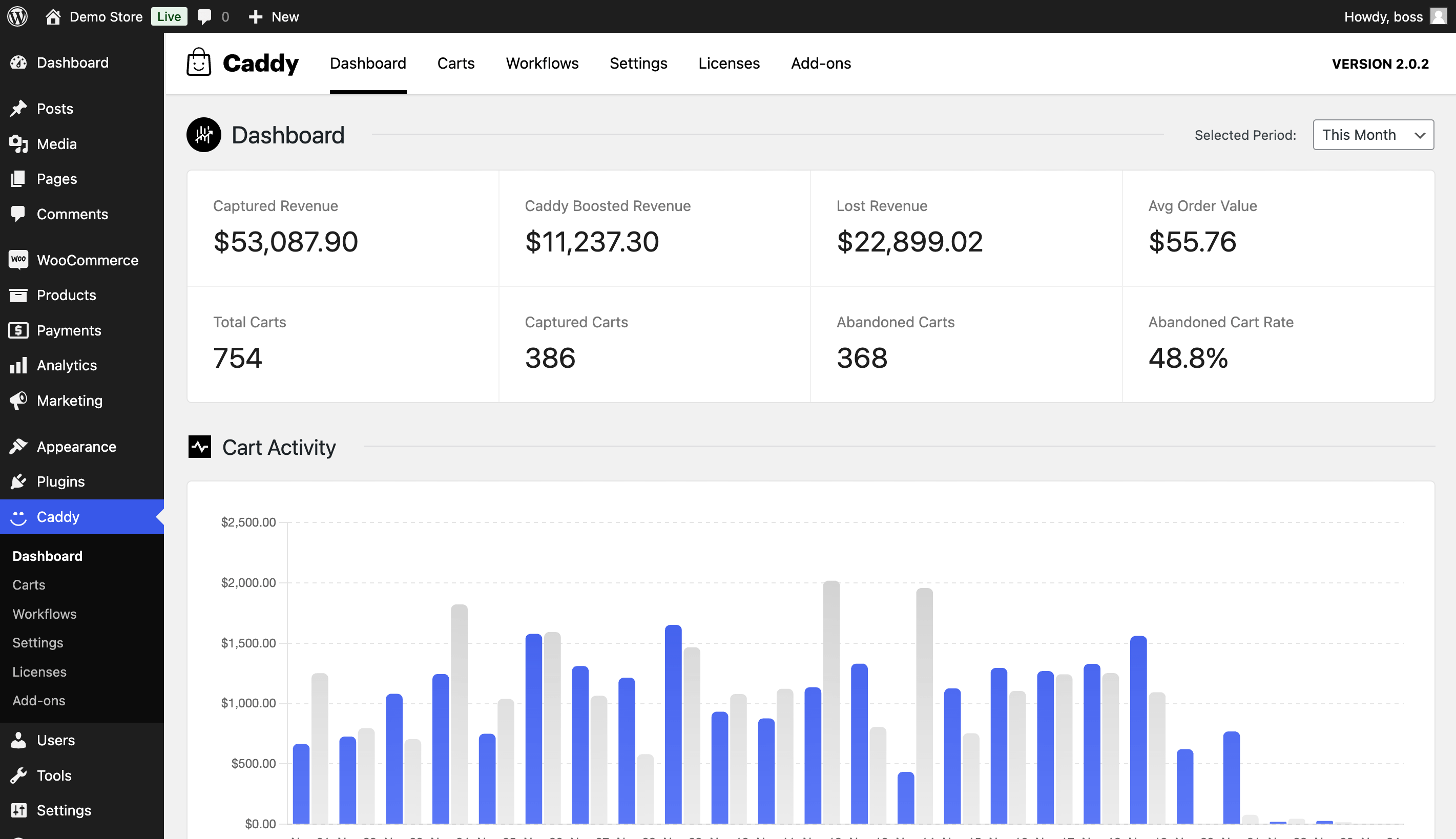
Analytics dashboard

Stop guessing whether your side cart is working. The Caddy Pro analytics dashboard, built with Chart.js visualizations and backed by custom database tables, tracks:

  • Revenue attributed to the side cart: See exactly how much money flows through Caddy.
  • Conversion rates: Understand what percentage of cart interactions lead to purchases.
  • Cart abandonment rates: Know where customers drop off.
  • Top performing products: Identify which items drive the most add-to-cart actions through the side cart.
  • Most abandoned products: See which items get added but never purchased, so you can adjust pricing, copy, or placement.

This is not a vanity dashboard. It is the data you need to make informed decisions about your product mix, pricing, and cart experience.

Cart session monitoring

See what is happening in your store right now. Cart session monitoring shows live shopping sessions: what customers have in their carts, where they are in the buying process, and how long they have been active. This is real-time visibility into your store’s revenue pipeline.

Abandoned cart tracking

Every abandoned cart represents lost revenue. Caddy Pro tracks abandoned carts automatically, logging what was in the cart, when it was abandoned, and the cart value. Over time, you build a clear picture of your abandonment patterns: which products, which price points, which times of day. That data informs everything from pricing strategy to email recovery timing.

Workflow automation engine

This is where Caddy Pro goes beyond analytics and into action. The workflow automation engine uses a custom post type interface to let you build rules-based cart experiences:

  • Free gift offers: Add a free sample when cart total exceeds $75.
  • Conditional recommendations: Show premium accessories when a customer adds a flagship product.
  • Display rules: Control exactly when, where, and for whom specific cart features appear.
  • Conversion events: Track specific actions to measure which workflows drive the most revenue.

Each workflow is a set of conditions and actions that you configure once and let run. No code required. The automation evaluates in real time as customers interact with the cart.

Who Pro is for

Caddy Pro is for store owners who have traffic and want to extract more revenue from it. If you are doing enough volume that a 5% improvement in cart conversion or a $3 increase in AOV would meaningfully impact your bottom line, Pro pays for itself quickly.

If you are just getting started or running a smaller store, the free version has everything you need. Upgrade when the data matters.


How to update

Existing Caddy users

If you are already running Caddy, the update is available now through your WordPress dashboard.

  1. Go to Dashboard > Updates in your WordPress admin.
  2. You will see Caddy listed with the 3.0 update available.
  3. Click Update Now.

If you are running Caddy Pro, update the free plugin first, then update the Pro add-on. Both will be available in your dashboard.

Important: Caddy 3.0 requires WordPress 6.5 or higher and WooCommerce 7.0 or higher. Check your versions before updating. If you are on older versions, update WordPress and WooCommerce first.

We always recommend testing on a staging site before updating on production, especially for a major version update. That said, we have tested 3.0 extensively across themes, plugins, and configurations. The transition should be smooth.

New users

Never used Caddy? Getting started takes about two minutes.

  1. Go to wordpress.org/plugins/caddy and download the plugin, or search for Caddy in Plugins > Add New in your WordPress dashboard.
  2. Install and activate.
  3. Go to WooCommerce > Caddy to configure your settings.
  4. That is it. The side cart is live on your store.

No account creation required. No email signup to access features. Install it and everything listed in the free features section above is working immediately.


What’s coming next

We are not slowing down after 3.0. The Interactivity API foundation opens up possibilities that were not practical on the old architecture. We have plans for deeper WooCommerce block integration, enhanced mobile cart experiences, and expanded automation capabilities in Pro.

We are also investing in the broader Caddy ecosystem: better documentation, more tutorial content, and tighter integrations with the tools WooCommerce stores already use.

The best way to stay in the loop is to follow our blog here on usecaddy.com or subscribe to our newsletter. We share product updates, WooCommerce cart optimization tips, and the occasional behind-the-scenes look at what we are building.


Try Caddy 3.0 today

Caddy 3.0 is the most capable free side cart plugin for WooCommerce. Built on modern WordPress architecture, packed with features that competitors charge for, and backed by a Pro tier that turns your cart into a data-driven revenue engine.

Start free: Download Caddy on WordPress.org. Product recommendations, save for later, free shipping meter, coupons, and more. All free. No catch.

Go Pro: Explore Caddy Pro. Analytics, automation, abandoned cart tracking, and workflow rules. Plans start at $99/year with a 14-day money-back guarantee.

Questions? Visit usecaddy.com for documentation, feature details, and support.

We built Caddy 3.0 for where WordPress is going, not where it has been. If you run a WooCommerce store, this is the side cart plugin built for your future.

Announcing Caddy Pro 2 – Smarter, Faster, and More Powerful!

We’re excited to announce the release of Caddy Pro 2, a major update packed with innovative features, performance enhancements, and powerful tools to help you drive conversions, streamline workflows, and create a seamless shopping experience for your customers.

Whether you’re looking to track cart activity, personalize your customer interactions, or simply add a bit of fun to your free shipping meter, this update has something for everyone. Let’s dive into what’s new in Caddy Pro 2!

🛒 Carts Tracking

Understanding customer shopping behavior is key to increasing conversions. With our new Carts Tracking feature, you can monitor real-time cart activity, including abandoned carts and active sessions. These insights allow you to monitor your cart activity and identify ways to recover lost sales.

📊 Analytics Dashboard

Say goodbye to guesswork! The new Analytics Dashboard provides an easy-to-use interface to visualize your cart performance. Monitor key metrics like cart abandonment rates, most abandoned products, most converted products, average order value, and more.

📈 Caddy Conversion Tracking

Measure what matters. Caddy now tracks the performance of recommendation conversions, giving you precise data on conversions attributed to Caddy. Understand the value Caddy brings to your store and make better decisions to maximize ROI.

  • Track in-cart recommendation conversions.
  • Track workflow conversions.
  • See tracked conversions in Caddy carts & dashboard pages.
  • See tracked conversions in WooCommerce orders pages.

🔄 Workflows: Automate and Personalize

Automation meets personalization with Workflows. These are customizable rules allow you to:

  • Trigger custom product recommendations in Caddy tailored to customer behavior.
  • Display Caddy Popups to grab attention at the perfect moment.
  • Auto-apply coupons based on specific conditions, delighting your shoppers and boosting conversions.

Plus see exactly how workflows are performing with trigger and conversion tracking.

We’re just scratching the surface here. Over the coming months we’ll be adding more triggers, and more customizable actions to make your cart even more powerful.

🎨 Fully Customize Caddy’s Appearance with the Customizer Integration

Want Caddy to match your store’s branding perfectly? With our new Customizer Integration, you can easily and instantly modify the entire look and feel of Caddy through the Customizer visual editor—no coding required.

⚡ Variations in Recommendations

Shoppers can now select product variation options from variable products directly in the cart instead of navigating away to the product page.

⚡ Performance Improvements

Speed matters, especially in eCommerce. We’ve made significant improvements to Caddy’s performance, ensuring faster load times and smoother interactions, creating a frictionless shopping experience for your customers.

🎉 Bonus: Confetti on Free Shipping Meter Completion

Who doesn’t love a little celebration? Shoppers will now see a fun confetti animation when they reach the free shipping threshold. It’s a small but delightful touch that enhances the shopping experience and motivates customers to add more to their cart.

Ready to elevate your store’s cart experience?

Upgrade Your Cart

10 Ways to Optimize Your WooCommerce Cart & Increase Conversions

Shopping cart abandonment has long been the nemesis of all retailers. Shoppers fill up their online carts with goods intending to buy, but then something will aggravate them, slow them down, or force them into a click they don’t want to make. They abandon their cart, and retailers watch helplessly as hundreds, even thousands of dollars of sales, are lost just before checkout. 

The Baymard Institute puts the average cart abandonment rate at just under 70%. That means your sales could increase by nearly 250%—if only you could ensure a filled cart turned into a sale. 

A well-designed cart can significantly improve your bottom line.

1. Provide all the information they need

Buyers want to know what they have already chosen. Therefore, your cart should offer full details of all items—not just “T-shirt,” but “T-shirt, red, XL”, so buyers can verify what they have chosen without having to take the time to click back into every single product. Also offer visual cues and reminders with thumbnail shots of their items. Thumbnails in the cart make it more visually appealing and much easier for buyers to edit and add to the cart.

2. Make it easy to edit

With each page they visit, buyers discover new options. If they have to navigate to their cart every time they change their mind, you will lose them. Buyers want to manage their cart without leaving their current page – remember, anything that interrupts their shopping can be a good reason to stop altogether. Offer them the ability to delete items or change quantities instantly so that they can update their cart quickly and easily. 

3. Make it fast

The more time customers spend on a cart page, the more likely they’ll leave it. Your main objective should be to lead the customer to checkout as quickly as possible. Keep the checkout button visible at all times to ensure that when the buyer is ready to check out that they are just one easy click away.

4. Make your cart sticky

Your cart should be visible at all times so that people can check out instantly at any moment. Choose a sticky cart like the Caddy Cart for WooCommerce that follows the shopper around the store. No matter what page they navigate to, they can see their cart, which keeps their potential purchases front of mind and ready to buy.

5. Make it easy to return

A cart is only abandoned if they NEVER return. But many buyers like to take a break, save certain items, or get opinions on their purchases. Therefore, offer them everything they need to return, such as the option to save the cart for later, a “save for later” list of items they want to remember, and the ability to share the cart with their friends and family.

6. Make the cart accessible across devices

Shoppers will use different devices throughout their day…but that doesn’t mean they need to leave your store, or their potential purchases, behind. If they have to start their cart fresh on every device, it’s enough of an annoyance to stop shopping altogether. Ensure that your cart is persistent and appears on any device where the shopper is logged in.

7. Keeps your costs transparent

The number one reason that buyers abandon their carts: extra and unexpected costs. When shoppers feel tricked, their emotions take over, and they will abandon a retailer. Many will happily buy elsewhere at the same price or even higher if they feel that those costs were transparent. Make sure that the buyer is never surprised by any charges. The Caddy Cart for WooCommerce offers the total cost for the items they have chosen, as well as the taxes, other fees, and an approximate shipping cost before it comes time to check out.

8. Accept ALL payment methods.

Online shopping is supposed to be easy. And that means your customers don’t want to fish around for a payment that suits you. Your site should accept not only major credit cards, but also PayPal, ApplePay, and GooglePay (and any new and popular methods that hit the web). Make sure no one has a reason to stop when it comes time to purchase.

9. Show that you can be trusted

Fear of internet fraud and credit card crime is real and tangible. According to buySAFE, 81% of online consumers feel concerned about purchasing from a website they don’t know. However, a study by TNS showed that 79% of shoppers agreed that a trust seal indicates that their information is secure. The use of Trust Seals within our cart like SSL, McAfee Secure, PayPal Verified, and TRUSTe Certified Privacy assures customer security and allows them to buy without worry. 

10. Offer promotions

A basic promo code field is a must, but beyond that, offer the buyer new and surprising promotions and offers. The Caddy cart for WooCommerce offers a free shipping meter, in-cart coupon offers, and targeted upsells and cross-sells according to what they have in their cart to provide your customers the ultimate shopping experience while also maximizing your average order value (AOV).